Is your business making money? The numbers are ready.
Reports come from the records you enter every day, not from a separate program. Seven reports for finance and stock; each can be filtered, shows its totals and prints on A4 landscape.
Sound familiar?
What's missing when you decide
Today: The month-end report means merging spreadsheets.
With Coudy: Reports come from the records you enter every day.
Today: Nobody knows how old the receivables are.
With Coudy: Account ageing slices receivables by due date.
Today: What's left from a sale is a guess.
With Coudy: Sales profitability is worked out with the average cost.
Today: A report goes round as a file.
With Coudy: It's shared by link; only those allowed see it.
How it flows
A number's path
A report isn't prepared somewhere else; it comes from the records.
- 01
Record
Invoices, vouchers and payments are entered.
- 02
Filter
Pick the dates and the report's own filters.
- 03
Total
Every filtered line is added up.
- 04
Output
Printed on A4 landscape or shared by link.
What you can do
Finance Reports
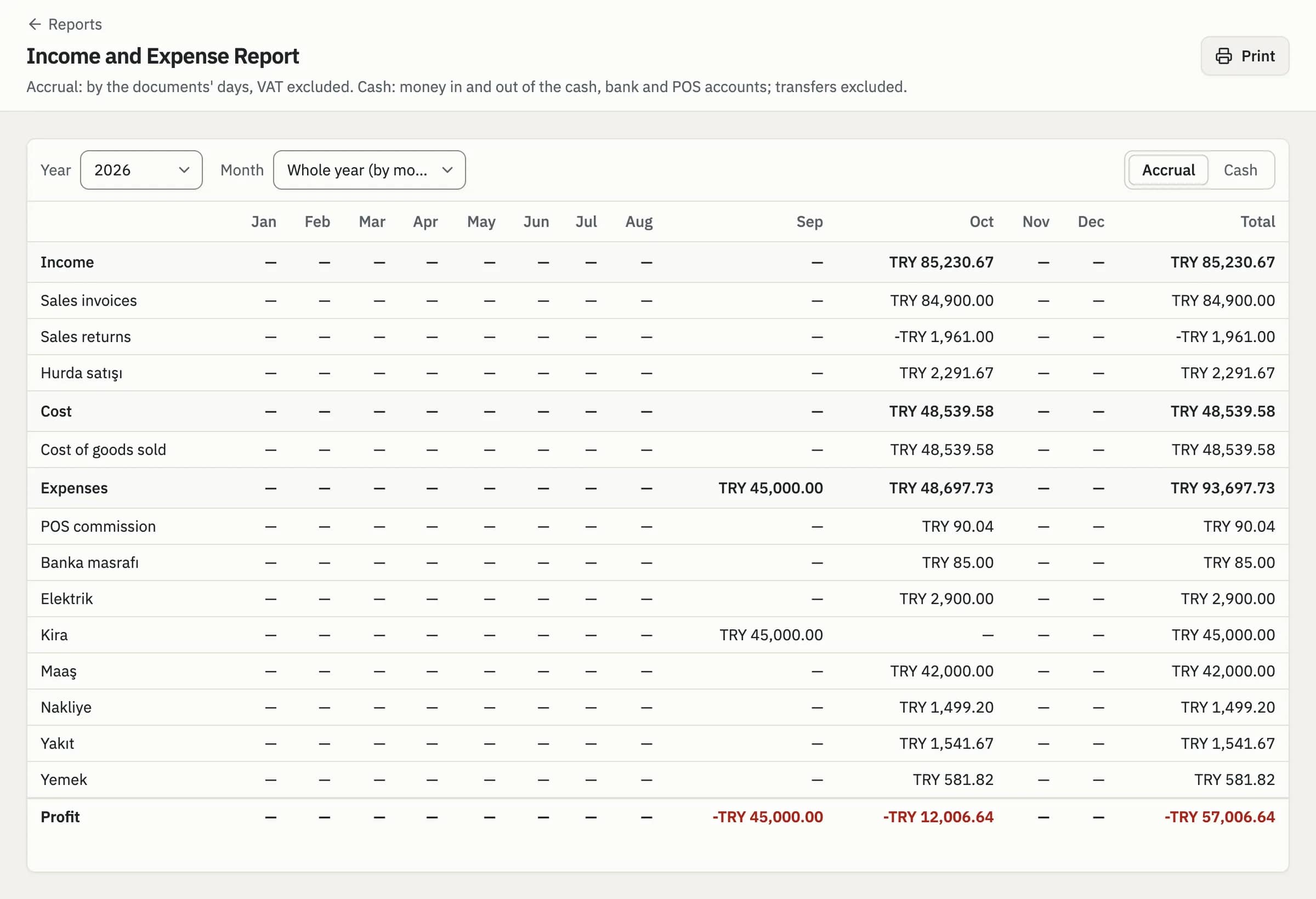
Reports that show where the money comes from and where it goes. Each comes from the records you enter every day; there's nothing extra to prepare.
- Income and Expense (accrual or cash basis)
- Cheque and Note Due Dates
- Account Ageing
- Sales and VAT Summary
Income and Expense · 2026
Stock Reports
Reports on the money on your shelves and the profit on what you sell. Profit is worked out with the average cost; no guessing. How much each item earns shows line by line.
- Stock Value
- Sales Profitability
- Average Costs
Stock Value · by Category
- Cleaning312 items₺48,320.00
- Food186 items₺36,900.00
- Stationery94 items₺12,450.00
Filter, Total, Print
Each report narrows by date and its own filters; totals are worked out over every filtered line. Reports print on A4 landscape. The totals row stands at the foot of every report.
- Dates and the report's own filters
- Totals over every filtered line
- Printed on A4 landscape
Account Ageing
0–30 days
₺84,200
31–60 days
₺21,500
60+ days
₺9,800
follow up
Share by Link
Filters are kept in the address; whoever you share the link with sees the same report, if their permissions allow it. To send a report to your accountant you don't prepare a file; sending the link is enough.
- Filters kept in the address
- The same report with the same filters
- Only those allowed see it
Shared Report · Income and Expense, October
- Selin YurtAccountingCan see
- Elif KayaSalesNo permission
Frequently Asked Questions
Can't find your question here? Write to Us
How is the income and expense report worked out?
Coudy's income and expense report can be read two ways. On an accrual basis it adds up amounts by document date, excluding VAT; on a cash basis it shows the money in and out of the cash, bank and POS accounts, with transfers between them left out. It comes from the invoices and vouchers you enter every day.
Can I export reports to Excel?
Today Coudy's reports are shown on screen and printed on A4 landscape; there is no Excel export yet. To send a report to your accountant you share its link; the filters are kept in the address, so they see the same report if their permissions allow. If you need an export, write to us.
Can every user see every report?
No. In Coudy a user sees only the reports their role allows; stock reports can be open while finance reports stay closed, for example. A shared report link opens only for someone with the permission too, so a link that reaches the wrong person shows them nothing.