Let customers sign on their own phone.
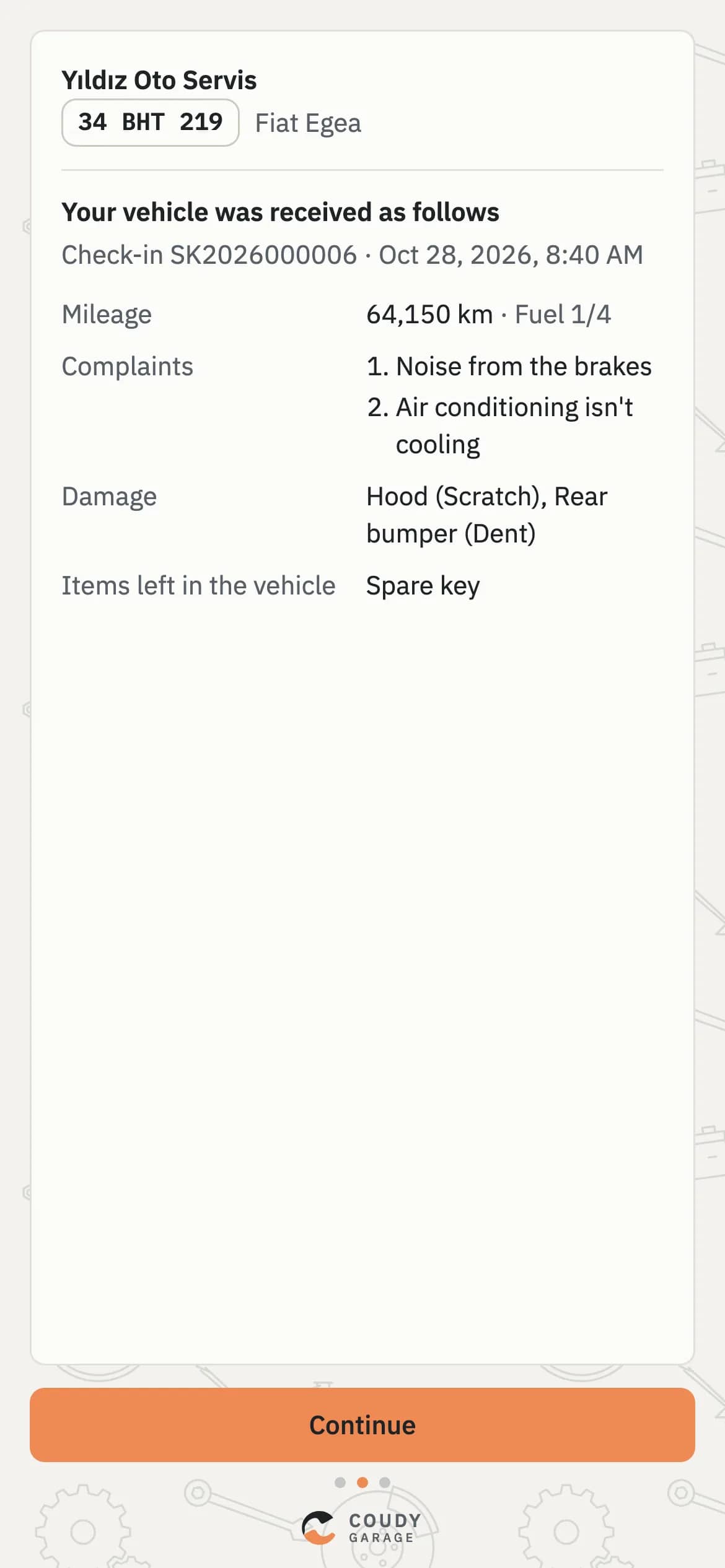
The check-in form, extra-work approvals and delivery reach the customer's phone through the same link. They read, approve and add a digital signature with a finger, and it stays with the record.
Sound familiar?
Why signatures are always a problem
Today: The signed form gets lost in a file.
With Coudy: The signature sits in the record, tied to the job.
Today: Extra work is agreed by phone, with no record.
With Coudy: Customers approve each item one by one.
Today: The tablet's flat; the signature waits.
With Coudy: Customers sign on their own phone.
Today: The link could reach the wrong person.
With Coudy: Details stay masked until name and plate are confirmed.
How it flows
A signature's path
From the QR code to the record, without an app.
- 01
QR Code
Shows on screen when the check-in is done.
- 02
Verify
The customer enters their name and plate.
- 03
Read
The car's condition and the work to do.
- 04
Sign
With a finger, on their own phone.
- 05
Record
The signature stays tied to the work order.
What you can do
One QR Code, the Customer's Own Phone
When you finish the check-in, a QR code appears on screen. The customer scans it with their camera and the link opens in the browser. No app to install; the link is valid for three days.
- No app to download, in the browser
- A link opened by a QR code
- The link stays valid for three days
Signing Link
Valid for
3 days
App
Not needed
Opens
In the browser
Details Protected, Customer Verified
Whoever opens the link confirms with their name and the car's plate. Until then the details stay masked, so the link is useless in the wrong hands.
- Verified by name and plate
- Details masked until verified
- A link in the wrong hands shows nothing
Verification
- Link openeddetails masked
- Name and plate enteredM. Demir · 34 ABC 123
- Details shown
Check-in, Approval and Delivery in One Flow
The same habit works at three moments. Each time the customer opens the same kind of link, reads and signs; each time the signature stays with the record:
- At check-in: the car's condition, complaints and the jobs to do
- During the job: each extra item that turns up
- At delivery: the work done and the car handed back
One Flow, Three Moments
- Check-incondition, complaints
- Extra workitem by item
- Deliverywork done
Customers Approve Extra Work Item by Item
When a new item turns up, the customer approves or declines each one separately. You see the decision on the work order straight away: declined work isn't started, and the invoice holds no surprises.
- Each extra job approved or declined on its own
- The decision shows on the work order at once
- A declined job isn't started
Extra Work · IE2026000006
- Wiper replacement₺420.00Approved
- Air-con gas₺900.00Declined
- Pollen filter₺350.00Pending
Opens Even When the Office Network Is Locked
Even if you've limited Coudy Garage to your office network, the customer's signature link opens from anywhere. Security and customer convenience don't get in each other's way. The link opens only that document; it gives no way into the rest of the panel.
- The signing link opens from anywhere
- The rest of the panel only from allowed networks
- Managed in Settings > Security
Settings · Security
- Coudy opens only from the office network
- The signing link opens from anywhere
Frequently Asked Questions
Can't find your question here? Write to Us
What if the customer doesn't have a smartphone?
In Coudy Garage you can print the check-in form and have it signed on paper. The check-in, work order, damage and photos stay on record in Coudy; only the signature is on paper. The form prints on A4 or A5 with your company logo.
How do I send the link to the customer?
If the customer is with you, they just scan the QR code in Coudy Garage with their phone. If not, copy the link and send it by WhatsApp or text message. The customer confirms their name and plate before seeing the document, and the link opens anywhere even if Coudy is limited to your office network.
How long is the link valid?
In Coudy Garage a signing link is valid for three days. After that a new link is created and the customer gets a new QR code or link. Whoever opens it confirms their name and plate before seeing the document; until then the details are masked.
What happens if the customer declines an extra item?
In Coudy Garage a declined item stays marked as declined on the work order and never goes into the work to do. Approved items carry on. Who approved or declined what stays on the work order, so hand-over and the invoice look at the same record.