How to open a work order: a step-by-step guide for workshops
What goes on a work order, how to split parts and labour, and how to get extra work approved: a step-by-step guide from check-in to hand-over.

6 min read
On this page
- What is a work order?
- What goes on a work order?
- From check-in to hand-over, step by step
- 1. Start from the check-in
- 2. Put parts and labour on separate lines
- 3. Assign a technician to each labour line
- 4. Keep the stage and the promised time up to date
- 5. Get extra work approved
- 6. Finish the job and invoice from the work order
- 7. Hand the car over with a signature
- The right way to get extra work approved
- Common mistakes
- Work orders in Coudy Garage
Mid-afternoon, a customer rings: "How's the car getting on?" The service adviser puts them on hold and walks into the workshop. The technician calls out from under the car: the pads have arrived, the discs are still on their way. The adviser goes back and says "ready this evening". It isn't, because nobody wrote down that the discs wouldn't arrive today.
The next day, while the invoice is being prepared, another question comes up. During the job the technician spotted that the rear shock absorbers were worn, the adviser rang the customer and the customer said "fine". Seeing the invoice, the customer says, "I only asked for a price." There is no record of that "fine" anywhere.
Both scenes have the same fix: a well-kept work order. This post covers what a work order is, what belongs on it, how to run it step by step from check-in to hand-over, and how to get extra work approved.
What is a work order?
A work order is the record of how the workshop will carry out the job agreed at check-in: which parts go on, which labour is done, which technician does it and when the car will be handed back. The check-in form records how the car arrived and what the customer asked for; the work order records how the workshop will deliver it.
A good work order answers three questions at any moment:
- What is being done to the car? Parts and labour, line by line.
- Who is doing it? Every line has its technician.
- When will it be finished? The job's stage and the promised time are written down.
When these answers are on one screen or one sheet, the service adviser doesn't need to walk into the workshop to answer the phone.
What goes on a work order?
Each part of the work order holds information you will come back to until the car is handed over.
| Section | What it holds |
|---|---|
| Vehicle and customer | Registration, make and model, mileage, customer name and phone |
| Complaint | The problem as the customer described it at check-in |
| Parts lines | Every part to be fitted, with quantity and price |
| Labour lines | Every job to be done, with its technician and price |
| Stage | Where the job stands now: waiting for parts, waiting for approval, in quality control |
| Promised time | The day and time promised to the customer |
| Extra work | Items found during the job and the customer's decision on each |
From check-in to hand-over, step by step
1. Start from the check-in
A work order shouldn't start as a blank page. The vehicle, customer and complaint written at check-in carry straight over, so the technician reads what the customer said without asking the adviser. We cover filling in the check-in in the vehicle check-in form guide.
2. Put parts and labour on separate lines
Don't leave "brake service" as a single line. Split it into the parts being fitted and the labour being done:
- Front brake pads (part)
- Front brake discs, pair (part)
- Brake service (labour)
Separate lines show the customer a clear price and record exactly which parts were used. The parts line also tells stock which item is going out.
3. Assign a technician to each labour line
More than one technician can work on the same work order: one on the brakes, another on an electrical fault. When every line has its technician, there is no argument about who did what. If you pay technician bonuses, they are worked out from these assignments too.
4. Keep the stage and the promised time up to date
The stage is the most-checked piece of information on a work order. If parts are on order it should say "waiting for parts"; if the customer's decision is pending, "waiting for approval". When the stage changes, the work order should change at once; a bulk update at the end of the day makes every answer given during the day wrong.
Write the promised time on the work order too. If it is going to change, tell the customer first, then update the work order.
5. Get extra work approved
When something new comes up during the job, add it to the work order as a separate item first, then get the customer's approval. Approved items join the job; declined items are not done. We look at how to record this step below.
6. Finish the job and invoice from the work order
Once every line is done and the car has passed quality control, it is ready for hand-over. The invoice is made from the work order's lines; you don't type the parts and labour again. Extra work the customer declined doesn't reach the invoice, because it was never done.
7. Hand the car over with a signature
At hand-over the customer sees the work done and signs to say they have collected the car. The signature at check-in, the approvals for extra work and the signature at hand-over together tell the whole story of the job.
The right way to get extra work approved
Customer approval for extra work should be written and item by item; a "fine" on the phone isn't enough to settle an argument over the invoice. The right flow is:
- The service adviser adds the new work to the work order as a separate item, with its price.
- The customer sees the item, ideally on their own phone, otherwise on paper.
- The customer approves or declines each item separately.
- The decision and its date stay on the work order; the technician only does approved items.
When several extras come up, don't pass them all with a single "yes". The customer may approve the shock absorbers and leave the tyres for another day. Item-by-item decisions give the customer a real choice and make the invoice right by themselves.
Common mistakes
- Leaving parts and labour on one line. Nobody knows what was fitted, stock doesn't add up and the customer can't follow the price.
- Not updating the stage. A work order that has said "in progress" since the morning tells nobody anything.
- Making verbal promises. A promise that isn't written down disappears when the adviser changes.
- Settling extra work on the phone. Without a record of the approval, the invoice argument is hard to win.
- Writing the invoice separately from the work order. While lines are retyped, a part gets forgotten or declined work slips onto the invoice.
Work orders in Coudy Garage
In Coudy Garage the work order starts from the check-in. Parts and labour lines, the technician on each line, the stage and the promised time sit on one screen; the timeline shows who opened the check-in and who approved the work. Parts used are reserved in stock, and when the job is done the invoice is made from the work order.
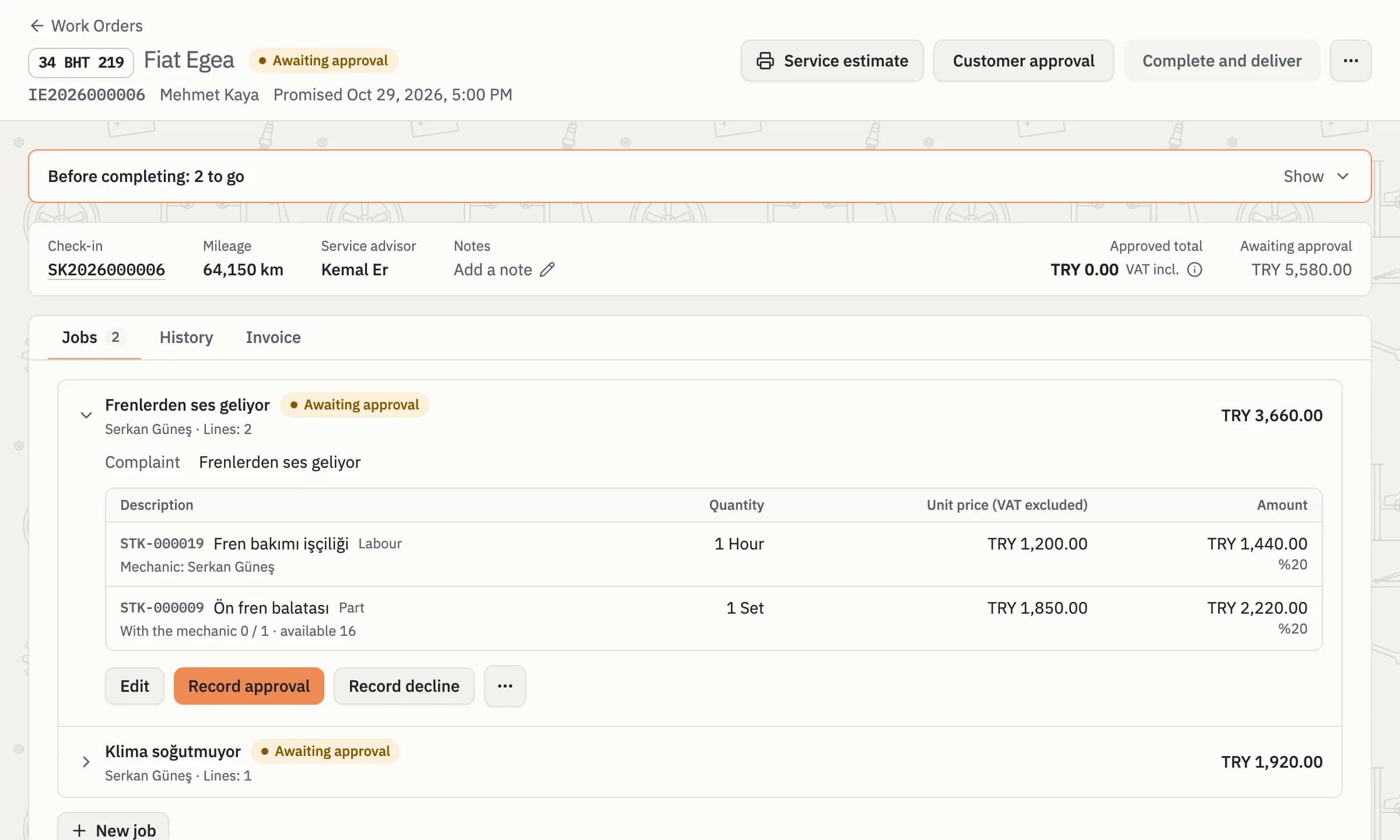
A work order in Coudy Garage: each line's technician, the stage and the promised time together.
Extra items are added to the work order and the customer approves or declines each one from a link on their phone; a declined item doesn't join the job. When a promised time passes, the team gets a notification. For more, see the Service and Check-in and Signature on the Phone pages.