e-Invoice or e-Archive invoice? The difference for workshops in Turkey
In Turkey the difference between an e-Invoice and an e-Archive invoice lies with the buyer. Which to issue to whom, how each one arrives, common mistakes.

5 min read
On this page
- What is the difference between an e-Invoice and an e-Archive invoice?
- How does an e-Invoice reach the customer?
- How does an e-Archive invoice reach the customer?
- Which should you issue to which customer?
- What do you need to switch to e-Invoice and e-Archive?
- A wrong invoice: cancel or return?
- Common mistakes
- e-Invoice and e-Archive in Coudy Garage
At collection time, two cars leave together. One belongs to a teacher who brought their own car in; the other was dropped off by a driver from a logistics company, who wants the invoice in the company's name. The service adviser is about to issue both invoices the same way when accounts calls out: "That company is registered for e-Invoice. Don't send them an e-Archive."
The next day the teacher rings: the invoice never reached them, because nobody asked for an e-mail address at check-in.
Both mix-ups come from the same place: the difference between an e-Invoice and an e-Archive invoice wasn't clear at the moment of invoicing. This post explains where the difference comes from, which one to issue to which customer, how each reaches the customer and the mistakes workshops in Turkey most often make.
What is the difference between an e-Invoice and an e-Archive invoice?
The core difference is the buyer: if the buyer is registered in the e-Invoice system you issue an e-Invoice, and if not, an e-Archive invoice. Both are electronic invoices, and only a business that has moved to e-Invoice and e-Archive can issue either.
So to pick the right document, you first ask: "Is the person or company I'm invoicing registered in the e-Invoice system?"
- Registered: e-Invoice. The document reaches the buyer electronically, through the Revenue Administration's (GİB) system.
- Not registered: e-Archive invoice. The buyer can be an individual or a business that hasn't joined the e-Invoice system.
Invoicing a company doesn't mean that company is registered for e-Invoice. Whether a buyer is registered is shown on GİB's list of registered users; your invoicing software or integrator can check this for you.
How does an e-Invoice reach the customer?
An e-Invoice goes through a GİB-approved integrator or GİB's own portal straight into the buyer's e-Invoice inbox. You don't need to e-mail it or hand over a printout; the document appears in the buyer's own e-Invoice account.
There are two e-Invoice scenarios:
- Basic invoice: The buyer receives the document but doesn't accept or reject it.
- Commercial invoice: The buyer can accept or reject the invoice within a set period.
Which one you use depends on your relationship with the customer and your accountant's advice. You'll find the current periods and rules on GİB's e-Document site.
How does an e-Archive invoice reach the customer?
An e-Archive invoice is delivered electronically, for example by e-mail, if the customer wants it that way, or printed on paper if not. The document is created electronically and reported to GİB; how it reaches the customer is up to you and the customer.
That's why two questions belong at check-in or hand-over:
- Who is the invoice for? A person or a company?
- How should it be delivered? If electronically, an e-mail address; if not, a printout.
If the customer wants it electronically, take the address at check-in. Asking at hand-over, with the customer standing at the till, takes time and invites typos.
Which should you issue to which customer?
Most workshop customers fall into one of four groups. A short table makes the service adviser's decision easier at the moment of invoicing.
| Customer | Document | How it arrives |
|---|---|---|
| Individual bringing their own car | e-Archive | E-mail or printout |
| Company registered for e-Invoice | e-Invoice | The company's e-Invoice inbox |
| Company not registered for e-Invoice | e-Archive | E-mail or printout |
| Fleet or leasing company | e-Invoice if registered | The company's e-Invoice inbox |
With fleet customers, whose name goes on the invoice matters too. The buyer is the company paying the invoice, not the driver who brought the car in or the employee who uses it. Settle this at check-in.
What do you need to switch to e-Invoice and e-Archive?
Which businesses must switch to e-Invoice and e-Archive is decided by criteria such as turnover, and these thresholds change over time. So take the thresholds and dates from GİB's current announcements and from your accountant (mali müşavir), not from a blog post.
Once the decision is made, the route usually looks like this:
- Talk to your accountant. Work out together whether you're required to switch and from what date.
- Choose how you'll send. You can use GİB's portal or a GİB-approved private integrator. An integrator that works with your invoicing software saves you typing every invoice twice.
- Set up your account. The integrator details are entered into your invoicing software once.
- Check the first invoices. Make sure the first few documents reach the buyer and their status completes.
You can also switch voluntarily even if you aren't required to. Make that decision with your accountant too.
A wrong invoice: cancel or return?
What to do when you spot a mistake on an invoice already sent depends on the document type and the nature of the mistake. Sometimes the document is cancelled; sometimes a return invoice is issued. Don't decide this on your own; ask your accountant.
The workshop's job is to catch mistakes early. Checking the buyer, the tax number and the amounts once more before issuing is far easier than dealing with a cancellation or a return later.
Common mistakes
- Assuming every company invoice is an e-Invoice. If the company isn't registered in the e-Invoice system, the document is an e-Archive invoice.
- Not asking for an e-mail address. If a customer wants it electronically and you have no address, the invoice never arrives.
- Changing the buyer at hand-over. A last-minute "put it in the company's name" means tax details are typed in a hurry and incompletely.
- Not checking the status of sent documents. A document stuck at the integrator gets noticed in the accounts months later.
- Following thresholds by hearsay. Thresholds change; get the current figures from GİB and your accountant.
e-Invoice and e-Archive in Coudy Garage
In Coudy Garage the invoice is made from the work order at hand-over and sent as an e-Invoice or e-Archive invoice through a GİB-approved private integrator. The document number comes from the integrator and the document's status is tracked automatically on the invoice itself, so you don't need to log in to the integrator's panel.
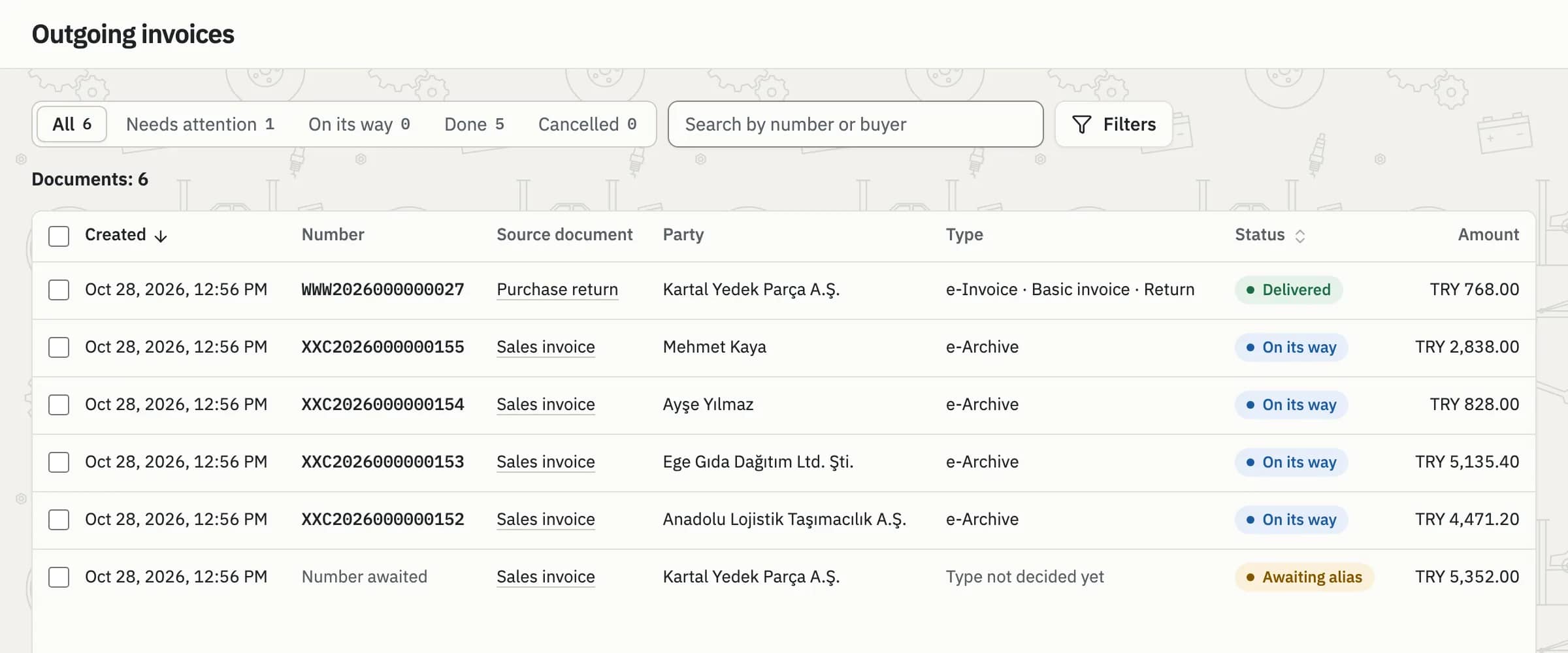
Sent documents: in transit, needing attention and completed, shown separately.
e-Invoices issued by your suppliers also arrive in Coudy; you accept or reject them and turn them into a purchase invoice in one step. A return invoice is created from the original in one click. For more, see the Invoicing and e-invoices and Finance pages.