How to keep track of spare parts stock in a workshop
A step-by-step guide to accurate spare parts stock in a workshop: the stock card, recording purchases and sales, stock counts and keeping depots tidy.

6 min read
On this page
- Why doesn't spare parts stock add up?
- What should a stock card hold?
- A part's journey from arrival to sale
- 1. Book stock in with a purchase
- 2. Reserve the part on the work order
- 3. Take it out of stock with the sale
- 4. Take returns back with a document too
- How do you run a stock count?
- More than one depot or branch
- Take prices from the card and the price list
- Common mistakes
- Spare parts stock in Coudy Garage
A technician asks for an oil filter. The computer shows three in stock; the shelf has none. The service adviser rings the supplier, the part arrives in the afternoon and the car slips to the evening. The same week, two boxes of brake pads turn up at the back of a shelf that no record knows about.
At the end of the month the accountant asks for the stock value. Nobody can answer, because what each part cost is scattered across several invoices and several notebooks.
Spare parts stock is one of the places where a workshop quietly loses money. This post covers why stock doesn't add up, what a stock card should hold, how to follow a part from arrival to sale, and how to run a stock count.
Why doesn't spare parts stock add up?
Stock usually stops adding up because a movement wasn't recorded: a part goes onto or off the shelf with no document to show it. The most common causes are:
- Parts leaving without an invoice. The technician takes a part from the shelf and it never reaches the work order or the invoice.
- Stock reduced by hand. A sales invoice is issued and the stock is reduced separately by hand; when one is forgotten, the two records no longer match.
- Returns that aren't recorded. A part handed back by a customer or a supplier goes back on the shelf but not back into the records.
- The wrong card. The same part has been set up on two cards under two names; one goes negative, the other shows too many.
The cure for all of these is the same: every part that goes onto or off the shelf moves with a document.
What should a stock card hold?
A stock card is a part's identity; it lets you find the part, price it correctly and follow its movements. A good card holds:
| Field | Why you need it |
|---|---|
| Name and code | To find the part in a search and on an invoice under one clear name |
| Barcode | To find the part by scanning it at the bench or at check-in |
| Category, brand and unit | To group similar parts and not mix up units with litres |
| Main supplier | To know who to order from when it runs out |
| Last purchase price | To see changes in the supplier's price |
| Average cost | To know what the part really cost you |
| Selling price | So the price is the same on every invoice |
Set a naming rule before you create cards. "Pads front", "Front pads" and "Brake pads, front" shouldn't be three cards for the same part. Searching before you create a card is the easiest way to avoid duplicates.
Set up labour and services as cards too. A service card holds no stock, but its price and sales report sit alongside your parts.
A part's journey from arrival to sale
Every movement of a part should be tied to the document that caused it, so you can always trace why a part's quantity went up or down.
1. Book stock in with a purchase
A part from the supplier goes into stock with a purchase invoice. A part put on the shelf without an invoice doesn't exist as far as the records are concerned. The purchase also updates the average cost, taking both the quantity on hand and the new purchase price into account.
2. Reserve the part on the work order
A part to be fitted to a car goes on the work order as a line. That way, when two technicians want the same part for two different cars at once, it's clear how many are left on the shelf.
3. Take it out of stock with the sale
The part leaves stock with the sales invoice. When you invoice from the work order, the parts line moves onto the invoice by itself, so there is no need to reduce stock by hand.
4. Take returns back with a document too
A part brought back by a customer returns to stock with a sales return; a part sent back to the supplier leaves stock with a purchase return. A part that goes back on the shelf without a return document will show up as "extra" at the next count.
How do you run a stock count?
A stock count compares what is really on the shelf with the records and corrects the difference with a document. Small, frequent counts are far less work than one big count a year:
- Count section by section. Count one shelf or one category each week. Don't try to count the whole store in a day.
- Stop movements while you count. Nothing should leave the shelf being counted; if it must, record it first.
- Record the difference with a count voucher. Enter the quantity on the shelf; the difference goes into stock and stays on record.
- Look for the cause. If the same part keeps showing a difference, it is leaving the shelf without an invoice somewhere.
More than one depot or branch
If you have more than one branch, track each branch's depot separately. A part that has run out at one branch may be sitting on a shelf at another; move it between depots with a transfer document. A part carried across by hand upsets the records at both ends.
A stock list per depot shows how many of each part are where, and which have run out. Checking it before you order saves you buying the same part twice.
Take prices from the card and the price list
A part's selling price shouldn't be typed on every invoice. The selling price on the card gives everyone the same price. If you offer special prices to fleets, insurers or account customers, use a price list linked to the customer; on that customer's invoice the price comes from the list, and a part that isn't on the list comes in at the card's price.
Common mistakes
- Handing out parts without an invoice. A part that will be "written up later" often never is.
- Opening more than one card for the same part. Stock is split across cards and none of them is right.
- Reducing stock by hand. When invoices and stock are updated separately, one of them is always forgotten.
- Fixing count differences without a record. If the difference isn't recorded, its cause is never found.
- Costing with the last purchase price. For a part bought at different prices, the real cost is the average.
Spare parts stock in Coudy Garage
In Coudy Garage, parts are kept on stock cards: barcode, category, brand, unit, main supplier, last purchase price, average cost and selling price sit on the same card. A sales invoice takes stock out, a purchase invoice brings it in, and the average cost is updated with every purchase. Parts used on a work order are reserved in stock, and purchases created from incoming e-Invoices also update stock.
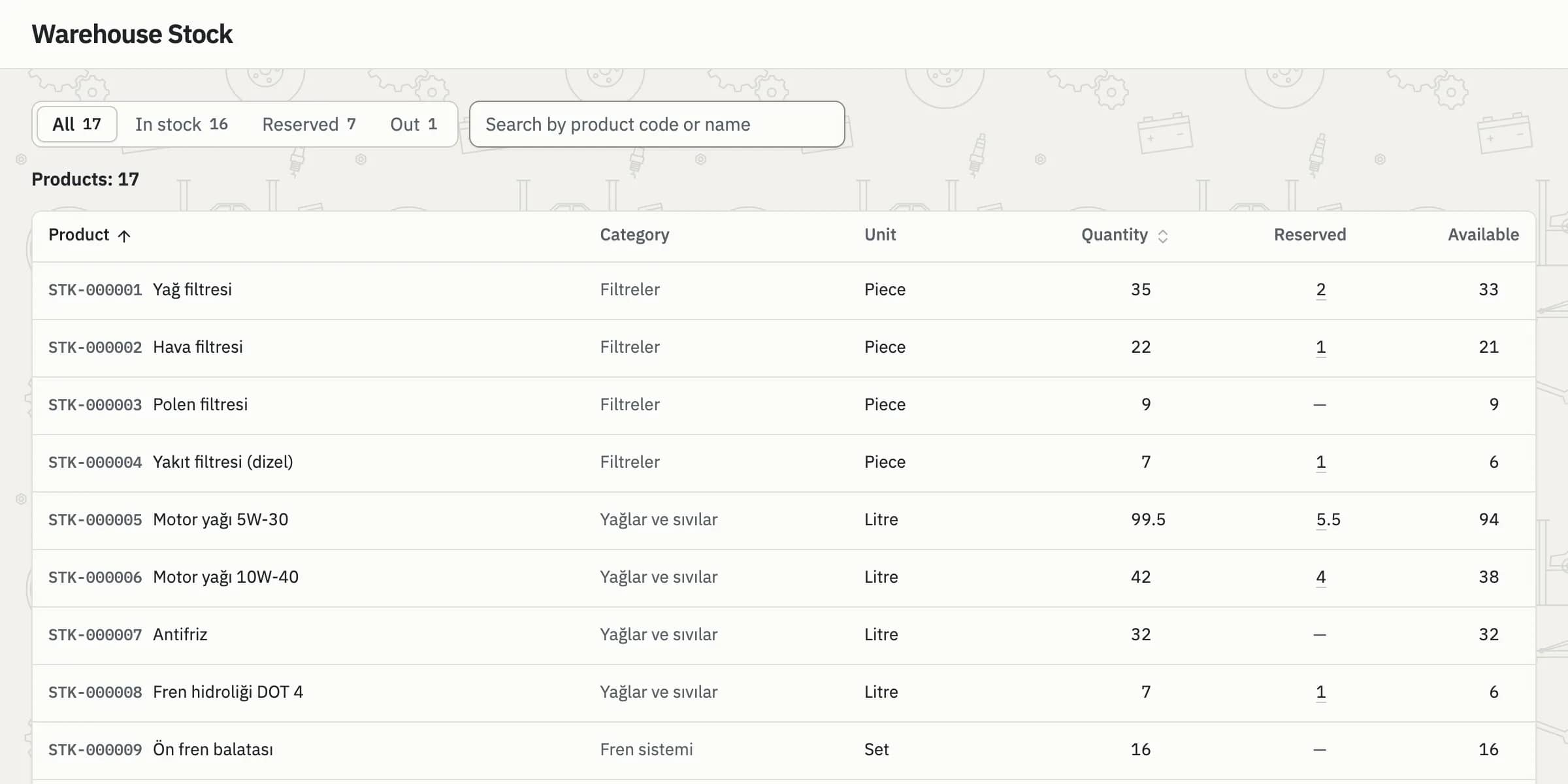
Warehouse stock: how many of each part are in which depot, with in-stock and out-of-stock items shown separately.
Receipt, issue, transfer, count and opening vouchers are recorded; a count voucher posts the difference to stock and every voucher shows with its own number. Customer-linked price lists are applied on the invoice automatically. For where parts fit into the job, see the work order guide; for the full stock features, see the Stock page.